Purpose: Unattended recording of outdoor environmental parameters for extended periods without recharging the battery.
Materials: Raspberry Pico, Waveshare Pico RTC DS3231, FS304-SHT30 stainless temp/humidity probe, capacitive soil moisture sensor.
Parameters recorded: Temperature, humidity, soil moisture
There are multiple RTC units on the market but the Waveshare will work in cold conditions. Other brand RTC modules failed in cold temperature, halting time keeping when below freezing then resuming with the time offset by the hibernation period.
The soil moisture sensor is intended for indoor use and the edges are not sealed against moisture migration. Use clear epoxy to encapsulate the exposed electronics and seal the edges. You can buy the same sensor properly sealed but at a much greater cost.
Battery saving: turn off unit and power on every hour just long enough to record data then power off until next recording. The Pico does not track time while powered off.
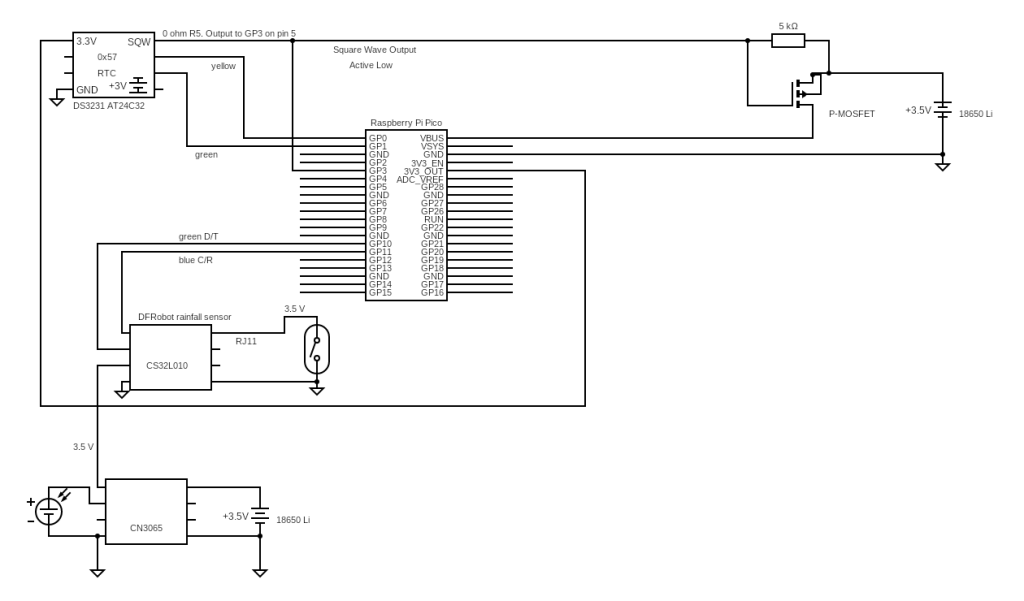
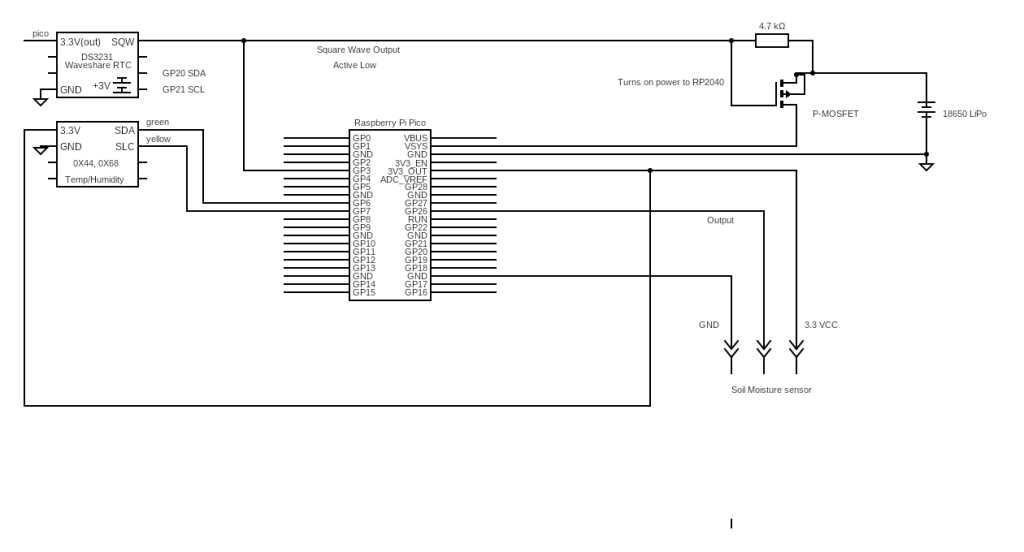
Timing control: Waveshare real time clock to tracks time and provides power on/off signal. The RTC is stackable with the Pico so external wiring is only for the power control signal.
Power control: RTC active low output turns on P-MOSFET to power on the Pico. Bridge R5 to connect the alarm to GP3 on the Pico and extend to the P-MOSFET. The main program reads time and sensors then writes to Pico on board memory and turns off the alarm.
Memory: Use Pico internal memory for data storage. The records are numerous over months but short and do not use a substantial portion of the local memory. An external microSD card can be added but field testing resulted in recording failures in cold weather.
Programming is in 3 units. Initialize time on the RTC, set the alarm, read and store the data. The first step only needs to be done once. Setting the alarm can be done multiple times usually minutes for testing then hours for field recording. Alarms run on the RTC independently of the main program on the pico. The main program does the work of reading and recording.
Set time.
# Rui Santos & Sara Santos - Random Nerd Tutorials# Complete project details at https://RandomNerdTutorials.com/raspberry-pi-pico-ds3231-rtc-micropython/# power cycle chip to clear any EIO errorimport timeimport urtcfrom machine import I2C, Pindays_of_week = ['Monday', 'Tuesday', 'Wednesday', 'Thursday', 'Friday', 'Saturday', 'Sunday']# Initialize RTC (connected to I2C channel 0)#different pins from sourcei2c = I2C(0, scl=Pin(21), sda=Pin(20))rtc = urtc.DS3231(i2c)# get the local time from the systeminitial_time_tuple = time.localtime() # tuple (microPython)initial_time_seconds = time.mktime(initial_time_tuple) # local time in secondsprint(initial_time_tuple)# Convert to tuple compatible with the libraryinitial_time = urtc.seconds2tuple(initial_time_seconds)print("OK")# Sync the RTCrtc.datetime(initial_time)
Set alarm covered in previous post. https://occasionalnotes263655029.wordpress.com/wp-admin/post.php?post=1816&action=edit
Main program
# Rui Santos & Sara Santos - Random Nerd Tutorials# Complete project details at https://RandomNerdTutorials.com/raspberry-pi-pico-ds3231-rtc-micropython/# 1.4 take out debug statementsimport timeimport urtcfrom machine import I2C, Pin, ADCdays_of_week = ['Monday', 'Tuesday', 'Wednesday', 'Thursday', 'Friday', 'Saturday', 'Sunday']# Initialize RTC (connected to I2C channel 0)# definition for Waveshare configurationi2c = I2C(0, scl=Pin(21), sda=Pin(20))rtc = urtc.DS3231(i2c)# Initialize temperature and humidity probe (connected to I2C channel 1)TH_i2c = I2C(1, scl=Pin(7), sda=Pin(6), freq=100000)# Initialize soil moisture probe inputsensor_AO = ADC(26)#---------------------------------------------------------------------------------#Temperature and humidity probe#------------------------------------------------------------------------------I2C_ADDRESS = 0x44MEASURE_CMD = b'\x2C\x10'# end temperature and humidity probe setup#---------------------------------------------------------------------------------#definition for temperature/humidity probe#library not needed for time and humdity probe. Reads registers directly and converts to correct units.def read_temperature_humidity(): try: TH_i2c.writeto(I2C_ADDRESS, MEASURE_CMD) time.sleep_ms(100)#allow probe to stabilize for reading data = TH_i2c.readfrom(I2C_ADDRESS, 6) if len(data) == 6: temp_raw = data[0] << 8 | data[1] hum_raw = data[3] << 8 | data[4] temperature = -45 + (175 * temp_raw / 65535) humidity = 100 * hum_raw / 65535 return temperature, humidity else: raise Exception("Invalid response length") except OSError as e: return None, None#-----------------------------------------------------------------------------------# end temperature/humidity probe definition#--------------------------------------------------------------------------------------------------def get_current_time(): now = rtc.datetime() formatted_time = f"{now.year}-{now.month:02}-{now.day:02}, {now.hour:02}:{now.minute:02}:{now.second:02}" return formatted_time#--------------------------------------------------------------------------------------# body of program#--------------------------------------------------------------------------------------#get temp and humidity from probedevices = TH_i2c.scan()#make sure probe is presentwith open('record.txt','a') as f: if I2C_ADDRESS in devices: temp, hum = read_temperature_humidity() moisture=sensor_AO.read_u16() if temp is not None: f.write(get_current_time() +", "+ str(temp)+", "+ str(hum)+", "+ str(moisture)+"\n") else: f.write("Failed to read data from sensor"+ "\n") else: f.write("Sensor not detected"+ "\n")#------------------------------------------------------------------------------------#RTC alread on timed interrupt. Only necessary to turn it off. Don't need to reset.time.sleep_ms(10)# allow chip to stablize before turning offrtc.alarm(False, 0)# turn off alarm, power lost here