There are many possible causes and most are routinely covered in help responses. However, sometimes it takes a deeper dive to find the root cause.
I encountered a problem that apparently was caused by a single event from software installation, OS upgrade or other random event that changed firewall settings and/or DNS settings. The firewall was apparently changed to block incoming L2TP ports. The firewall diagnosis came from a Microsoft expert. The conversation and data files for diagnosis are not online.
Port blocking: the symptom was the connection was attempted but nothing happened then the attempt timed out. One other symptom was the virtual Win10 hosted on the same machine could connect but not the host machine. That means the problem was localized to some setting on the host machine and not elsewhere in the network. Wireshark did not show any ISAKMP packets being sent by the host but captured those sent from the virtual machine.
A deeper look with logman showed ISAKMP packets generated but immediately blocked.
In admin mode at the command prompt
- command: logman start placeholder -ets -p Microsoft-Windows-WFP -o ikev2.etl
- try to connect to the VPN
- command: logman stop placeholder -ets
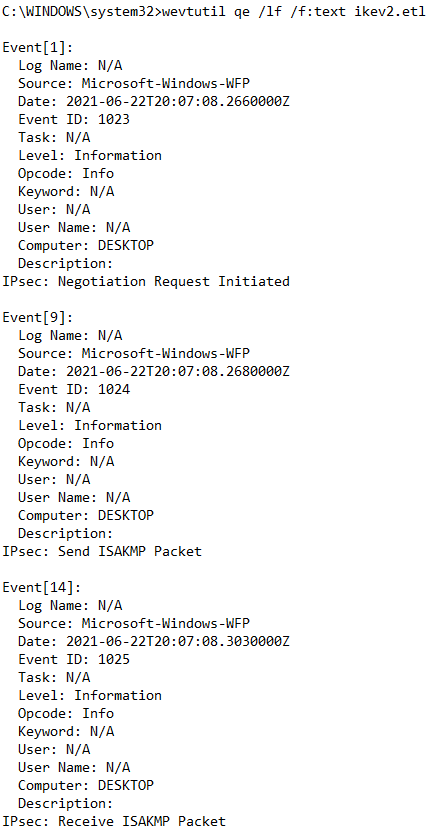
- command: wevtutil qe /lf /f:text ikev2.etl
- look for messages: “IPsec: Send ISAKMP Packet” and “IPsec: Receive ISAKMP Packet”
I never did find the specific rule causing the problem but worked around by adding a firewall rule to allow incoming L2TP UDP connectivity ports: 500, 1701 and 4500
The full text of the problem and logman commands I used to investigate this specific problem is at
https://docs.microsoft.com/en-us/answers/questions/111251/windows10-vpn-using-ipsecikev2-won39t-connect.html
Successful connection partial example. In the unsuccessful connection, no ISAKMP packets were sent.

 Jerry's blog